

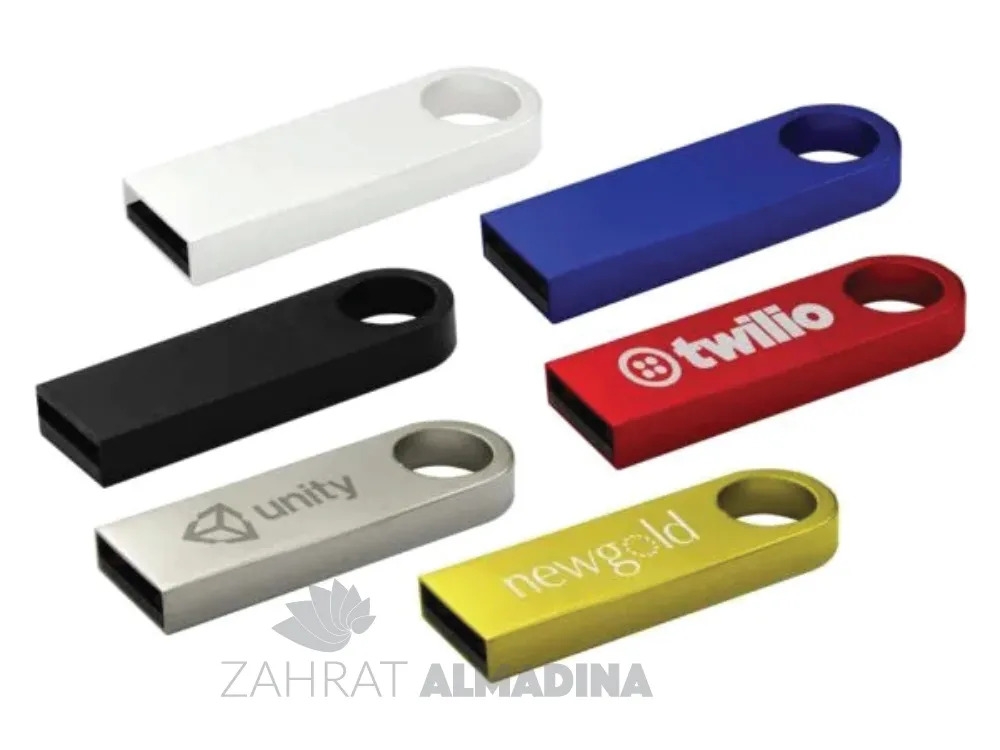

USB flash drives remain a convenient way to store and transfer digital files, even as cloud storage and online sharing become more common. Businesses still use them to distribute presentations, product catalogues, training materials and other documents that recipients may need offline. With USB flash drive printing Dubai, companies can add their logos, brand colours or other artwork to a practical device that people can keep and use. However, choosing the right promotional USB drive involves more than selecting an attractive design. Storage capacity, connector type, compatibility, casing material and printing quality all affect its usefulness. Understanding these details helps businesses select suitable devices for employees, customers, exhibitions and professional events.
What to Consider When Choosing USB Flash Drive Printing Dubai
A USB flash drive should be easy to use, compatible with the recipient's devices and suitable for the files it needs to store. Its appearance matters for promotional purposes, but technical specifications should come first.
Select the Right Storage Capacity
Storage capacity determines how much information a flash drive can hold. The appropriate size depends on the type and quantity of files being distributed.
-
8GB: May suit basic documents, presentations and small collections of files.
-
16GB: Offers additional space for business documents, images and general file sharing.
-
32GB: Can be useful for larger presentations, training resources and mixed media.
-
64GB and above: May suit projects involving larger files, high-resolution images and video content.
These are general examples rather than fixed limits. Actual usable capacity can be lower than the advertised figure because of formatting and file-system requirements.
Businesses should estimate the size of their digital content before ordering. For example, a company distributing a small collection of PDF brochures may not need the same capacity as a training provider sharing video lessons and supporting documents.
Check Device Compatibility
USB drives are available with different connector types. Traditional USB-A connectors are still found on many desktop computers and laptops, while USB-C is increasingly common on newer devices.
Some products offer dual connectors, allowing users to connect the same drive to different types of equipment. This can be useful for organisations whose employees and customers use a mixture of devices.
Before placing an order, consider the equipment commonly used by the intended audience. A connector that does not fit the recipient's device can make an otherwise attractive promotional gift inconvenient.
Consider Transfer Speed
USB standards influence how quickly files can be transferred. USB 2.0, USB 3.0 and newer USB standards offer different performance levels, but actual speeds also depend on the flash memory, controller, host device and file type.
A drive used mainly for small documents may not require the same performance as one intended for large video files. Businesses should check the manufacturer's stated specifications rather than relying only on the connector's appearance.
Different Types of Custom USB Flash Drives
USB drives come in several shapes and materials. The choice affects their appearance, durability and suitability for different promotional activities.
Metal USB Flash Drives
Metal USB drives have a solid appearance and are often selected for professional gifts. Aluminium and other metal casings can provide a neat surface for branding and may be suitable for engraving.
Their compact construction makes them easy to carry on a keyring or in a laptop bag. However, the design should protect the connector when the drive is not in use.
Plastic USB Flash Drives
Plastic models are available in many colours, shapes and sizes. They can be a practical option for bulk promotional orders and may offer more flexibility when matching a company's brand colours.
Some designs have swivel covers, caps or integrated protective sections. The quality of the casing and connector should be checked because inexpensive construction may affect long-term use.
Wooden USB Flash Drives
Wooden USB drives offer a natural appearance that can suit businesses looking for something different from standard plastic or metal designs. They may be selected for creative agencies, eco-themed campaigns or personalised gifts.
Wood types and finishes vary, so the colour and grain can differ between individual products. Businesses should review a sample if consistency across a large order is important.
Card USB Drives
Card-style USB drives are flat and lightweight. Their broad surface can provide room for printed artwork, making them useful for promotional campaigns and event materials.
They are easy to distribute with brochures or information packs. However, their flat construction may offer less protection against bending than a more solid casing.
Dual Connector USB Drives
Some flash drives include both USB-A and USB-C connectors. This design can make file sharing easier when users work with different computers, tablets or compatible mobile devices.
Before choosing one, check that the product supports the required devices and operating systems. Connector availability alone does not guarantee compatibility with every smartphone or tablet.
Printing and Branding Methods for USB Drives
The printing method affects how a logo or design appears on the finished product. The available options depend on the casing material, shape, surface area and level of detail in the artwork.
Screen Printing
Screen printing transfers ink through a prepared mesh screen onto the surface of a product. It is often suitable for simple logos, text and designs with a limited number of colours.
This method can work well on compatible flat surfaces. However, very small lettering and detailed graphics may not reproduce clearly, particularly on compact USB drives.
UV Printing
UV printing uses specially formulated inks that are cured using ultraviolet light. It can reproduce colourful artwork and detailed designs on compatible surfaces.
This option may suit USB drives that need multiple colours or more complex branding. The final result depends on the casing material, surface preparation and printing equipment.
Laser Engraving
Laser engraving uses a focused laser to mark the surface of a material. It is commonly considered for metal USB drives because it can create a permanent-looking mark without applying conventional ink.
The appearance depends on the metal and its surface finish. Engraving is often suitable for company logos, names and simple designs, but the contrast may differ between products.
Choosing the Right Branding Method
The most suitable method depends on the design and the material. A simple logo on a metal casing may be better suited to engraving, while a colourful design on a compatible plastic surface may benefit from UV printing.
Before confirming an order, check:
-
Whether the printing method works with the selected casing.
-
How much space is available for the logo.
-
Whether the design needs one colour or several.
-
How clearly small text will appear.
-
Whether the printed or engraved finish is consistent across samples.
-
Whether the final artwork has been approved.
A sample is particularly useful when the logo contains fine details or the USB drive has a very small branding area.
Where Businesses Can Use Branded USB Flash Drives
USB drives can support different business activities because they combine physical branding with digital information. Their usefulness depends on the content stored on them and whether recipients have compatible devices.
Corporate Events and Exhibitions
Businesses attending exhibitions and conferences often distribute brochures, catalogues and product information. A branded USB drive can provide a digital alternative for visitors who prefer to keep documents together.
For example, an engineering company could distribute a drive containing product specifications, technical drawings and presentation files. Visitors can review the information later without needing to search through several printed documents.
The content should be organised into clearly labelled folders. A short introductory file can explain what is included and provide the company's contact information.
Employee Welcome Kits
Companies can include USB drives in welcome packs for new employees. They may be used to provide training documents, staff information, internal resources or presentation templates.
A branded drive can also form part of a larger welcome set containing notebooks, pens and other office accessories. The selected storage capacity should reflect the type of files employees need to access.
Educational and Training Programmes
Training centres, schools and professional education providers may use flash drives to distribute course materials, reference documents and learning resources.
For example, a training organisation might prepare separate folders for each module, with presentations, reading materials and exercises. This makes the content easier to navigate.
However, businesses should ensure that the files are suitable for the recipients' devices and do not include unnecessary or outdated information.
Product Launches and Presentations
A company introducing a new product may use USB drives to share product images, brochures, demonstration videos and technical information with invited guests.
This approach can be useful when recipients need to keep several files for later reference. The drive should be tested before distribution to confirm that the content opens correctly.
Client and Partner Gifts
A customised drive can be included in a business gift set or given to clients who regularly exchange digital files. Its practical value is more important than decorative features alone.
Businesses comparing corporate gifts dubai may consider USB drives alongside notebooks, drinkware, pens and other useful promotional products. The right combination depends on the recipient, occasion and available budget.
How to Prepare USB Drives for Promotional Distribution
A printed USB drive is only useful if it works properly and contains information that recipients can access. Preparing the content carefully is just as important as selecting the physical product.
Organise the Digital Files
Files should be arranged in clearly named folders. Avoid placing unrelated documents together or using vague names that make information difficult to identify.
For example, a business distributing a product catalogue might organise the drive into folders such as:
-
Company information.
-
Product catalogues.
-
Technical specifications.
-
Presentations.
-
Images and videos.
-
Contact details.
This simple structure makes it easier for recipients to find the information they need.
Check File Formats
Different devices and software programmes support different file formats. PDF documents are often useful for distributing brochures and reference materials because they preserve the document layout across compatible devices.
Video, presentation and spreadsheet files should also be checked for compatibility. If recipients may use different operating systems, consider including common file formats that do not require specialist software.
Scan and Test the Drives
Every drive should be checked before distribution. Businesses should confirm that the files open correctly, the folders are organised and the storage capacity is sufficient.
It is also sensible to scan the files using appropriate security software. Avoid distributing unnecessary executable files or unknown programmes, as these may create security concerns for recipients.
Consider Data Privacy
USB drives can be misplaced or shared with other people. Avoid storing confidential employee details, customer records or sensitive business information unless suitable security measures are in place.
If the files are intended for public distribution, review their contents carefully. Check that no private documents, internal notes or outdated information have been included by mistake.
How to Select a Suitable USB Printing Supplier
The quality of a promotional USB drive depends on its casing, memory components, connector, branding and final testing. Comparing suppliers based only on price may overlook important differences.
Review the Physical Product
Ask for product photographs or a sample to check the casing, connector and overall finish. The drive should feel well assembled, with no loose components or rough edges.
If the design includes a cap or swivel cover, check that it moves properly and protects the connector. For metal or wooden models, examine the finish and branding area.
Confirm Technical Specifications
The quotation should clearly identify the storage capacity, USB standard, connector type and any other important technical details.
Businesses should avoid relying on vague descriptions such as "high-speed USB" without checking the actual specification. If the drive will be used to distribute large files, transfer performance should be considered before ordering.
Check Branding and Artwork
The supplier should confirm the printable area and available branding methods. A logo may need to be simplified if the surface is too small for fine details.
Review the proof for correct spelling, proportions, colours and positioning. For engraving, check how the design appears on the actual casing material.
Zahrat Al Madina Printing is one Dubai-based business that buyers may come across when researching customised printing and promotional products. As with any supplier, it is important to confirm the available USB models, storage options, branding methods and technical specifications before placing an order.
Compare Quotations and Production Time
A complete quotation should include the product model, storage capacity, quantity, branding method, packaging and delivery arrangements.
Production time may vary depending on the model, quantity and artwork approval process. Businesses ordering for a conference or product launch should allow enough time for samples, revisions and final testing.
Common Mistakes to Avoid When Ordering Custom USB Drives
A few checks before production can help prevent problems with both the physical product and its digital content.
Choosing Capacity Without Checking File Sizes
Ordering drives with insufficient storage can create problems when recipients try to access the complete collection of files. Check the combined file size and allow some additional space for future use.
Selecting an Incompatible Connector
A USB-A drive may not connect directly to a device that only has USB-C ports. Consider the equipment used by the intended audience and select a suitable connector or dual-interface design.
Overcomplicating the Logo
Small devices have limited branding space. Too much text or detailed artwork may become difficult to read.
A simple logo or short brand name is often more suitable. The design should remain recognisable at the actual printed size rather than only looking good on a large computer screen.
Ignoring Product Testing
A drive that looks attractive may still have problems with its memory or connector. Test samples and, where practical, check the finished batch before distribution.
Confirm that the stated capacity is available, files transfer correctly and the device works with the intended equipment.
Forgetting Packaging
USB drives are small and can be misplaced easily. Individual boxes, sleeves or other suitable packaging can protect them during storage and distribution.
Packaging also gives businesses an additional place to include product information or a short message, provided it does not make the overall gift unnecessarily complicated.
Conclusion
Branded USB flash drives can be useful promotional products when businesses select the right storage capacity, connector, casing and printing method. Their value comes from combining a practical digital storage device with clear, professional branding. Before placing an order, buyers should review technical specifications, test samples, prepare files carefully and approve the final artwork. Attention to these details helps avoid compatibility issues and ensures that recipients can use the device as intended. A well-chosen USB drive can remain useful beyond an event, training session or business meeting.