Vector File Format: Types, Benefits, Uses, and How to Choose Right One

In modern graphic design and digital publishing, image quality plays an important role in creating professional visual content. Whether designing logos, preparing marketing materials, developing website graphics, or producing large format prints, selecting the right image format can significantly affect the final result.
A vector file format is a popular choice for these applications because it allows graphics to be resized without losing their original quality. Vector graphics are widely used in graphic design, branding, advertising, printing, and digital illustration.
Unlike raster images, which consist of individual pixels, vector graphics use mathematical paths, points, lines, curves, and shapes to create visual elements. This makes them suitable for projects that require precise details, flexibility, and consistent image quality.
Understanding vector file formats, their different types, and their practical applications can help designers, businesses, and content creators make informed decisions when working with digital graphics.
What Is a Vector File Format?
A vector file format is a digital graphics format that stores visual information using mathematical equations instead of a fixed arrangement of pixels. These equations define the position, shape, size, color, and outline of different graphic elements.
One of the main characteristics of vector graphics is their resolution independence. This means that an image can be enlarged or reduced without becoming blurry or pixelated. For example, a logo designed as a vector graphic can be printed on a small business card or displayed on a large advertising banner while maintaining its sharp appearance.
Another useful feature is editability. Designers can modify individual elements, change colors, adjust dimensions, and reshape objects without recreating the entire design. These features make vector formats valuable for professional design and printing projects.
What Are Common Types of Vector File Formats?
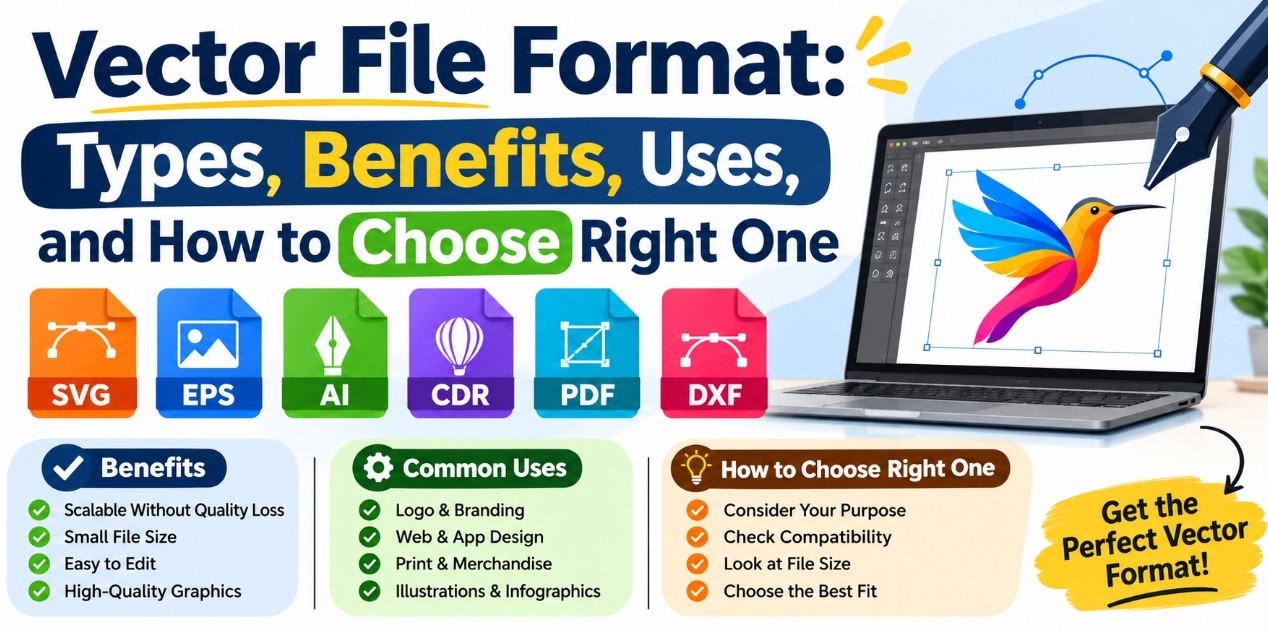
Different vector file formats serve different purposes. Some are designed for web graphics, while others are commonly used for professional illustration, document sharing, and printing.
1. SVG (Scalable Vector Graphics)
SVG is a widely used vector format for websites and digital applications. It supports scalable graphics, transparency, and interactive features. Since SVG files use XML based structures, they can also be edited through compatible design software and text editors.
SVG is particularly useful for website icons, logos, diagrams, and illustrations because it maintains image clarity across different screen sizes.
2. AI (Adobe Illustrator Artwork)
AI is a vector file format associated with professional illustration software. It supports advanced editing capabilities, multiple layers, typography, shapes, and complex artwork.
Designers commonly use this format when creating detailed illustrations, logos, promotional graphics, and other artwork that may require future modifications.
3. EPS (Encapsulated PostScript)
EPS is an established graphics format used in professional printing and publishing workflows. It can store vector illustrations and other graphic elements while helping preserve their appearance when transferred between compatible applications.
It is particularly useful for certain commercial printing requirements, technical illustrations, and graphic production tasks.
4. PDF (Portable Document Format)
PDF is a versatile document format that can contain both vector and raster graphics. Vector based PDF files are useful for sharing artwork, illustrations, diagrams, and print ready documents.
They also help preserve document layouts and formatting across compatible devices and software applications.
5. CDR (CorelDRAW File Format)
CDR is a graphics file format used for creating and editing vector illustrations. It supports text, shapes, colors, layers, and other design elements.
This format is commonly associated with sign making, packaging design, advertising materials, and printing projects.
What Is Difference Between Vector and Raster File Formats?
Understanding the difference between vector and raster graphics helps determine which format is appropriate for a particular project. Raster graphics consist of pixels, which are small individual squares that combine to create an image. Common raster formats include JPEG, PNG, and GIF.
These formats are suitable for photographs, realistic images, and detailed textures. However, enlarging a raster image beyond its original resolution can result in visible pixelation and reduced image quality.
Vector graphics use mathematical paths rather than individual pixels. They can be resized without losing their sharpness, making them particularly useful for logos, icons, illustrations, diagrams, and typography.
Neither format is suitable for every situation. Raster graphics are generally preferable for photographs, while vector graphics are often the better option for designs that require scalability and precise editing.
How to Choose Right Vector File Format
Choosing the right vector file format depends on the purpose of your project, editing requirements, and software compatibility. For website graphics and digital illustrations, SVG is often a suitable option because of its scalability and browser support.
For complex artwork that requires ongoing editing, a native vector project file is generally preferable. For sharing artwork and preparing documents for printing, PDF may be appropriate. EPS can also be useful when a particular printing workflow requires it.
Before exporting a design, check the requirements of the intended platform, client, or printing service. It is also advisable to keep an editable original file so that future adjustments can be made without recreating the artwork.
Frequently Asked Questions About Vector File Formats
1. What Is Best Vector File Format for Professional Design?
The best format depends on the intended application. SVG is suitable for web graphics, while editable native project formats are useful for professional illustration. PDF and EPS can be appropriate for sharing artwork and specific printing workflows.
2. Can Vector Images Be Resized Without Losing Quality?
Yes. Vector images use mathematical paths rather than fixed pixels, allowing them to be enlarged or reduced without losing their sharpness. However, the final result also depends on the elements included in the artwork. Embedded raster images do not automatically gain resolution when a vector document is resized.
3. Are Vector Files Better Than Raster Images?
Neither format is universally better. Vector graphics are suitable for logos, illustrations, icons, and designs requiring scalability. Raster images are generally more appropriate for photographs and realistic images with complex textures.
4. Can Vector Files Be Converted Into Other Image Formats?
Yes. Vector files can be exported or converted into raster formats such as PNG and JPEG. This is useful when graphics need to be displayed on platforms that do not support vector files. However, exporting to a raster format creates an image with a fixed resolution.
Conclusion
Vector file formats play an important role in modern graphic design, digital publishing, branding, and commercial printing. Their scalability, editability, and ability to preserve sharp graphic details make them valuable for a wide range of creative applications.
Understanding formats such as SVG, AI, EPS, PDF, and CDR helps designers select the right option according to their project requirements. By considering image quality, software compatibility, editing needs, and intended use, it becomes easier to manage digital artwork effectively. Choosing an appropriate vector file format also helps maintain consistent and professional graphics across digital platforms and printed materials.