


What Is the Difference Between EHR and EMR Software?
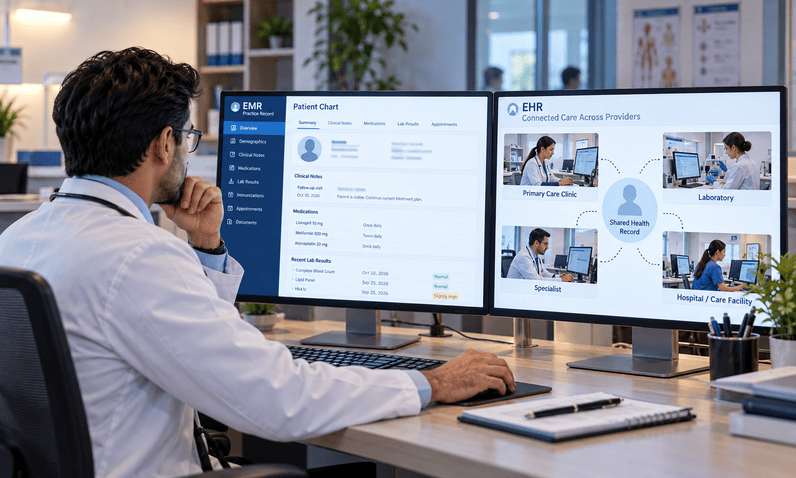
Imagine a patient visits a primary care physician, receives laboratory testing, and is referred to a specialist. The primary care office has the patient's medical history stored digitally, but the specialist still needs to request records or ask the patient to repeat information. The records are electronic, yet sharing them remains a challenge.
This is one of the practical differences that separates an electronic medical record (EMR) from an electronic health record (EHR). Both systems replace paper-based documentation with digital records, but they can differ in how broadly patient information is organized, accessed, and exchanged.
When evaluating EHR and EMR software for medical practices, the decision should go beyond the name of the product. A practice needs to understand how the system handles clinical documentation, prescriptions, laboratory results, referrals, reporting, and communication with other healthcare organizations. The actual capabilities of a particular product matter more than its label.
An EMR may be suitable for a practice that primarily needs digital charting and patient history management within its own organization. An EHR may be a better fit for a practice that needs a more comprehensive view of patient health and dependable information exchange with authorized providers and external systems.
Neither option is automatically right for every clinic. The best choice depends on the practice's specialty, size, current workflows, plans for growth, integration requirements, and available budget.
The most useful medical record system is not simply the one that stores information digitally. It is the one that helps the right people access and use that information when care decisions need to be made.
Key Statistics: How Common Is EHR Adoption?
Electronic records are now an established part of healthcare delivery in the United States. Data from the Office of the National Coordinator for Health Information Technology (ONC) provides a useful picture of adoption among physicians and hospitals.
- 95% of office-based physicians: Had adopted some form of EHR by 2024, according to ONC's adoption data updated in June 2026.
- 91% of office-based physicians: Had adopted a certified EHR by 2024, reflecting the widespread use of certified health information technology.
- More than 99% of non-federal acute care hospitals: Had adopted a certified EHR by 2024, according to ONC's national adoption statistics.
These figures describe EHR adoption, not the proportion of practices using a particular vendor or the number still relying on EMR-labeled products. They demonstrate that electronic records are widespread, but adoption alone does not establish whether a system is easy to use, interoperable, or appropriate for a particular practice.
Source: ONC, Office-Based Physician EHR Adoption and National Trends in Hospital and Physician Adoption of Electronic Health Records.
What Is EMR Software, and How Does It Work?
An electronic medical record is a digital version of the paper chart traditionally maintained by a medical office, clinic, or healthcare facility. It organizes clinical information so that authorized staff can document encounters, review medical history, and support diagnosis and treatment.
Instead of searching through paper files, a provider can open a patient's record and review previous visits, recorded diagnoses, medications, test results, and other relevant information. The practice can also use the data to monitor changes over time and identify patients who may be due for follow-up care.
The defining idea is that an EMR provides a digital record of care within a practice or organization. Its ability to exchange information with other providers depends on the product's actual capabilities and integrations.
Digital Patient Charts and Clinical Notes
EMR software allows clinical staff to record information in a structured digital format. Depending on the product, the chart may include medical history, allergies, diagnoses, vital signs, treatment plans, progress notes, and medication information.
Structured documentation can make records easier to search and review. A physician assessing a patient with a recurring condition, for example, may be able to compare previous notes and recorded measurements rather than reconstructing the history from separate paper documents.
The quality of the record still depends on the information entered. Incomplete documentation, inconsistent terminology, and poorly configured templates can make digital records difficult to use, even when the underlying software functions correctly.
Tracking Patient History Within a Practice
One of the practical benefits of an EMR is the ability to follow a patient's health information across visits at the same organization.
A clinician may review earlier diagnoses, examine previous laboratory values, and see how a condition has changed. Staff may also use recorded information to identify patients who need routine screenings, follow-up appointments, or other preventive services.
These functions can support continuity of care within the practice. However, a record maintained by one organization does not automatically contain every relevant detail from outside providers.
Common EMR Features
The specific feature set varies by vendor, but an EMR may include:
- Electronic clinical charts and progress notes.
- Patient history, allergies, and medication records.
- Diagnosis documentation and treatment plans.
- Vitals and laboratory results entered or received by the practice.
- Clinical templates for common encounters.
- Search and reporting tools for patient information.
- Access controls for authorized clinical and administrative staff.
An EMR can be valuable for a practice that needs reliable digital documentation. The important question is whether it also supports the information-sharing and operational workflows the organization requires.
What Is EHR Software, and How Does It Expand on Digital Records?
An electronic health record is designed to provide a broader view of a patient's health information over time. It can include information from different care settings and support authorized sharing between providers, laboratories, specialists, and other connected healthcare organizations.
The distinction is not that an EHR contains clinical information while an EMR does not. Both can contain detailed clinical records. The difference is the broader role an EHR is designed to play in connecting information across the patient's care journey.
A More Comprehensive View of Patient Health
An EHR may bring together diagnoses, medication lists, allergies, laboratory findings, imaging reports, clinical notes, and treatment information from multiple encounters or sources.
This wider view can be particularly useful when patients receive care from several providers. A specialist may need to understand the patient's previous treatment, current medications, and relevant test results before making a clinical decision.
The completeness of that view depends on whether information is available, exchanged successfully, matched to the correct patient, and presented in a usable format. An EHR cannot automatically display records that have not been received or made accessible.
Information Exchange Between Authorized Providers
Interoperability is an important consideration when selecting an EHR. It refers to the ability of different health information systems to exchange information and use it meaningfully.
For example, a primary care practice may need to send a referral and relevant clinical information to a specialist. A laboratory may return results electronically, while a hospital may make a discharge summary available to the patient's regular clinician.
A well-configured EHR environment can support these exchanges, but not every EHR connects automatically to every external system. Compatibility, data standards, permissions, configuration, and vendor support all influence what information can move between organizations.
The ONC explains the role of EHRs and secure health information exchange in its EHR benefits overview.
Supporting Coordination Beyond One Office
When several healthcare professionals participate in a patient's care, access to relevant information can reduce unnecessary repetition and help providers understand what has already happened.
Consider a patient referred for a specialist consultation. If the specialist can access the referral reason, relevant clinical history, and available test results, the team may spend less time collecting information that already exists.
This does not eliminate the need to verify details or obtain missing records. It gives the care team a better foundation for coordinating the next step.
EHR vs. EMR: What Are the Most Important Differences?
The terms EHR and EMR are often used interchangeably in software marketing. Some products described as EMRs offer sophisticated data exchange, while some EHR products may have limited connectivity with outside organizations. For this reason, the distinction should be treated as a general description of purpose rather than a guarantee about every product.
Scope of Patient Information
An EMR is commonly centered on the patient's digital chart within one practice. An EHR is designed to support a broader view of health information that may extend across providers and care settings.
For a single-specialty clinic, a practice-centered chart may cover much of its everyday documentation. A multi-provider organization coordinating care with external specialists may need stronger capabilities for gathering and sharing information.
Information Sharing and Interoperability
The ability to exchange information is one of the most important differences to investigate.
A system may allow staff to export a document or send a record manually without offering a fully connected workflow. Another may support structured electronic exchange with specific laboratories, referral partners, or health information networks.
When comparing products, ask which exchange methods are supported, which connections are already available, and whether additional fees or implementation work are required.
Clinical and Administrative Workflows
Both EMR and EHR products can support clinical documentation, but their additional capabilities vary. Some include scheduling, e-prescribing, laboratory connectivity, patient communication, clinical alerts, and reporting. Others rely on separate applications for these functions.
A practice should assess the entire workflow rather than assume that an EHR label means every feature is included. A well-designed EMR may meet a clinic's needs, while an EHR with poor usability or limited integration may create unnecessary work.
Comparison at a Glance
|
Area |
EMR Software |
EHR Software |
|
Main purpose |
Digital clinical records within a practice |
A broader health record designed to support care across settings |
|
Patient history |
Typically centered on information maintained by the organization |
Can combine information from multiple providers and sources |
|
External information exchange |
Depends on available features and integrations |
Designed to support wider information exchange |
|
Clinical documentation |
Commonly supported |
Commonly supported |
|
Lab and specialist connectivity |
May be available through integrations |
Often a key evaluation priority |
|
Administrative functions |
Vary by product |
Vary by product |
|
Best-fit consideration |
Practices focused on internal digital charting |
Practices needing broader information access and coordination |
The distinction is useful, but the product specifications should determine the final decision. Ask vendors to demonstrate real workflows instead of relying solely on terminology.
Which Features Should You Compare Before Choosing a System?
The most useful comparison begins with everyday tasks. Ask clinicians and administrative staff where they lose time, which information they struggle to find, and which steps require repeated entry or manual communication.
The phrase medical practice software solutions can cover products with very different purposes, from clinical records to scheduling and billing. Compare specific functions and workflows rather than assuming all-in-one platforms provide the same capabilities.
Clinical Documentation and Customization
Review how the system supports progress notes, examination findings, diagnoses, medication lists, and treatment plans.
Templates should reflect the practice's specialty and visit types. A family medicine office may need different documentation structures from a behavioral health clinic or a specialist practice.
Ask whether staff can configure templates, how changes are managed, and whether the system makes it easy to review earlier encounters. A template that saves time for one provider but creates extra work for another may require adjustment.
E-Prescribing and Laboratory Connectivity
If the practice regularly sends prescriptions electronically or receives laboratory results, confirm how these workflows operate.
Questions worth asking include:
- Which e-prescribing functions are included?
- Can the system connect with the laboratories the practice uses?
- How are incoming results matched to the correct patient?
- How are abnormal or unreviewed results flagged?
- What happens when an external connection is unavailable?
The vendor should explain which functions are built in, which depend on third-party services, and which require separate setup.
Scheduling and Practice Administration
Clinical records are only part of a medical office's workflow. Appointment scheduling, patient registration, reminders, task management, and reporting also affect how staff work.
A practice should determine whether these functions are included in the same platform, provided through a connected module, or managed through a separate application.
If the system includes scheduling, check how it handles provider availability, appointment types, cancellations, and changes. If administrative functions remain separate, confirm how information moves between the systems.
Reporting and Data Access
Reporting tools can help practices monitor appointment activity, documentation completion, clinical follow-up, and operational workload.
However, the presence of a dashboard does not guarantee that the reports will answer the practice's questions. Ask for examples of standard reports and determine whether the required information can be filtered, exported, or reviewed over time.
The practice should also understand how it can retrieve its records if it changes vendors. Data export, migration support, and the format of available information are important considerations before signing a contract.
Usability and Staff Training
A system can offer extensive features and still be difficult to use. Complicated navigation, excessive clicks, poorly designed templates, or inconsistent workflows may add to the administrative burden.
Request demonstrations involving realistic tasks. Have the people who will use the software test common activities, such as opening a chart, documenting a visit, reviewing results, and completing a referral.
Training should cover actual workflows, not just a tour of the interface. The vendor should explain how new employees are trained, how product updates are communicated, and where staff can get help when a workflow stops working as expected.
What Does Implementation Involve, and How Can a Practice Avoid Disruption?
Moving from paper charts or an existing digital system requires more than installing software. The practice must prepare its data, configure workflows, train staff, test integrations, and establish procedures for resolving problems after launch.
A rushed implementation can disrupt appointments and documentation. A structured plan helps the practice identify risks before they affect daily operations.
Assess Existing Workflows Before Migration
Start by mapping how information currently moves through the practice, from scheduling and registration to documentation, prescriptions, referrals, billing, and follow-up.
Identify which steps are working well and which rely on duplicate entry or manual communication. This helps determine which workflows should be preserved, simplified, or redesigned.
The practice should also define who is responsible for implementation decisions. Clinical leaders, administrative managers, IT staff, and the vendor may all need to contribute.
Plan Patient Data Migration
Moving existing records into a new platform requires decisions about which data must be transferred, how it will be mapped, and how its accuracy will be checked.
The practice should identify active patients, historical records, medications, allergies, test results, and other information required for safe and effective workflows. Not every legacy field will necessarily map directly into the new system.
Before go-live, test representative records and verify that important information remains complete and readable. Keep a documented process for investigating missing, duplicated, or incorrectly mapped data.
Configure the System Around Real Clinical Work
Templates, user permissions, appointment types, referral workflows, and reporting settings should reflect the practice's operations.
Avoid configuring every feature at once without a clear purpose. Begin with essential workflows and validate them with the staff who will use them. Additional functions can be introduced in stages when appropriate.
Train Staff and Test Integrations
Training should be specific to each role. Providers need to understand documentation and clinical workflows, while front-office staff may focus on scheduling and registration. Administrative and billing employees may need training on their own modules.
Test external connections before relying on them in live operations. This includes laboratory interfaces, e-prescribing, referral exchanges, and other systems used by the practice.
Prepare for Go-Live and Ongoing Support
Set aside time for final checks, issue reporting, and staff assistance during launch. Make sure employees know whom to contact when a record is missing, an integration fails, or a workflow behaves unexpectedly.
After implementation, review staff feedback and operational measures. A successful launch is not the end of the process. The system may need adjustments as the practice learns how it performs under normal workload.
A successful software implementation is measured by how well the new workflow works in practice, not simply by whether the system has gone live.
How Should You Compare Vendors, Costs, and Long-Term Value?
The purchase price is only one part of the cost of a clinical record system. Practices should evaluate implementation, training, integrations, support, data migration, and ongoing operating expenses alongside the features included in the contract.
A lower-cost system may be a sensible choice when it meets the practice's requirements without creating significant manual work. A more comprehensive platform may be worth considering when it replaces several disconnected applications or supports workflows the practice genuinely needs.
Understand the Full Cost of Ownership
Ask vendors to separate recurring subscription or licensing fees from one-time charges and optional services.
Potential costs may include:
- Initial setup and configuration.
- Data migration and validation.
- Training and onboarding.
- Integration with laboratories, pharmacies, or other systems.
- Additional modules, users, or locations.
- Technical support and maintenance.
- Future data export or migration assistance.
Request written pricing assumptions so that different proposals can be compared fairly. Confirm whether the quoted price includes all the features and services required for the intended workflow.
Evaluate Vendor Support and Reliability
Support quality matters when the system is used throughout the working day. A delayed response to a login problem or a failed interface can affect clinical and administrative operations.
Ask about support hours, response targets, escalation procedures, planned maintenance, service availability, and the process for reporting security incidents.
It is also useful to ask for references from organizations with similar specialties and workflows. Their experiences may help reveal implementation challenges that are not obvious during a sales demonstration.
Check Interoperability and Data Portability
Do not assume that a product can connect with every external system. Ask vendors to demonstrate the exact integrations the practice needs and explain any technical or contractual limitations.
Data portability deserves equal attention. The practice should understand how records can be exported, what formats are available, whether documents and structured data are included, and what assistance the vendor provides during a future transition.
Assess Value Through Practical Measures
Rather than relying on broad promises of efficiency, establish a baseline before implementation and review performance afterward.
Useful measures may include:
- Time required to complete and review clinical documentation.
- Frequency of duplicate data entry.
- Time needed to retrieve external records.
- Number of unresolved interface or data-matching problems.
- Staff training and support requirements.
- Completion of relevant follow-up tasks. User feedback on navigation and workflow fit.
These measures help the practice determine whether the system is addressing the problems that justified the investment.
EHR vs. EMR Software: A Decision-Making Checklist
Use this comparison to identify which capabilities deserve the most attention during vendor evaluation.
|
Decision factor |
An EMR-focused system may fit when... |
An EHR-focused system may fit when... |
|
Clinical documentation |
Digital charting is the main priority |
Digital charting is needed alongside broader information exchange |
|
Patient information |
Most relevant information is maintained within the practice |
Information from multiple providers or care settings is important |
|
External coordination |
Outside records are needed occasionally and can be handled through existing processes |
Regular exchange with specialists, laboratories, or other organizations is required |
|
Practice structure |
The practice has relatively straightforward workflows |
Multiple locations or connected care teams need coordinated information |
|
Integration requirements |
Few external connections are needed, or existing connections are sufficient |
Multiple interfaces and dependable exchange are central requirements |
|
Administrative features |
Separate tools already meet scheduling and billing needs |
A more connected clinical and administrative workflow is a priority |
|
Growth plans |
Current needs are stable and well supported |
Expansion may increase the need for shared records and connected workflows |
|
Final selection criteria |
Usability, documentation, security, and cost meet requirements |
Interoperability, usability, security, integration, and cost meet requirements |
This is a general guide, not a strict classification. Many modern products combine EMR and EHR capabilities. Evaluate the actual functions, integrations, and limitations of each product before making a decision.
Frequently Asked Questions About EHR and EMR Software
Is EHR software better than EMR software?
Not automatically. An EHR is designed to support a broader view of patient health information and exchange across care settings, while an EMR is commonly centered on records within a practice. The better choice depends on the product's actual features and the practice's clinical, operational, and integration needs.
Can an EMR share information with other healthcare providers?
Yes, depending on its capabilities and integrations. Some products marketed as EMRs support electronic exchange with laboratories, specialists, or other systems. Practices should confirm which connections are supported and whether additional configuration or fees are required.
Can a medical practice switch from an EMR to an EHR?
Yes, but the transition requires planning. The practice should assess data migration, record mapping, integrations, staff training, security, and workflow changes. Before signing a contract, confirm how historical records and other required information will be transferred and validated.
What features should a small medical practice prioritize?
Start with reliable clinical documentation, easy access to patient history, appropriate security controls, usable templates, and the integrations needed for everyday care. Depending on the practice, electronic prescribing, laboratory connectivity, scheduling, reporting, and billing workflows may also be essential.
Does EHR software automatically improve efficiency?
No. EHR software can support better information access and more connected workflows, but results depend on usability, configuration, staff training, data quality, and integration. Practices should evaluate their own workflows and measure whether the software reduces unnecessary work without creating new problems.
Final Thoughts: Choosing the Right Record System for Your Practice
The difference between an EMR and an EHR is useful to understand, but the product label should not make the decision for you. An EMR can provide effective digital documentation within a practice, while an EHR is designed to support a broader view of patient health information and exchange across care settings.
For some clinics, a straightforward record system with a small number of reliable integrations may be enough. Others need a more connected environment that supports referrals, laboratory information, multiple providers, and related administrative workflows. In either case, usability, data security, interoperability, implementation, and long-term cost deserve careful attention.
FutureMD Solutions offers talkEHR alongside practice management capabilities intended to connect clinical and administrative activities. Practices considering this platform or any other vendor should verify the features, integration options, support arrangements, and costs that apply to their specific requirements.
The best choice is the system that fits the way your practice delivers care, gives authorized staff access to the information they need, and supports reliable workflows as the organization develops. A careful comparison based on real tasks and demonstrated capabilities will be more useful than choosing based on the EHR or EMR label alone.
Choose the record system that fits your practice's work, supports appropriate information sharing, and remains practical for the people who use it every day.
- Goth Lifestyle
- Fashion & Style
- Music & Bands
- Art & Photography
- Creative Writing & Poetry
- Events & Scene
- Occult & Spirituality
- DIY & Tutorials
- Beauty & Self-Care
- Relationships & Dating
- Gaming & Media
- Tech & Gadgets
- Body Art & Piercings
- Underground Culture
- Spotlights & Interviews
- Travel & Places
- Lifestyle & Daily Life
- Fitness & Health
- Travel & Adventure
- Books & Literature
- Tech & Gaming
- Movies & TV
- Food & Drinks
- Humor & Memes
- Pets & Animals
- General Arts & Crafts

 English
 Arabic
 French
 Spanish
 Portuguese
 Turkish
 Dutch
Dutch
 Italiano
 Russian
 Romaian
 Portuguese (Brazil)
 Greek
Greek
