


Common Causes of Smartphone Charging Problems
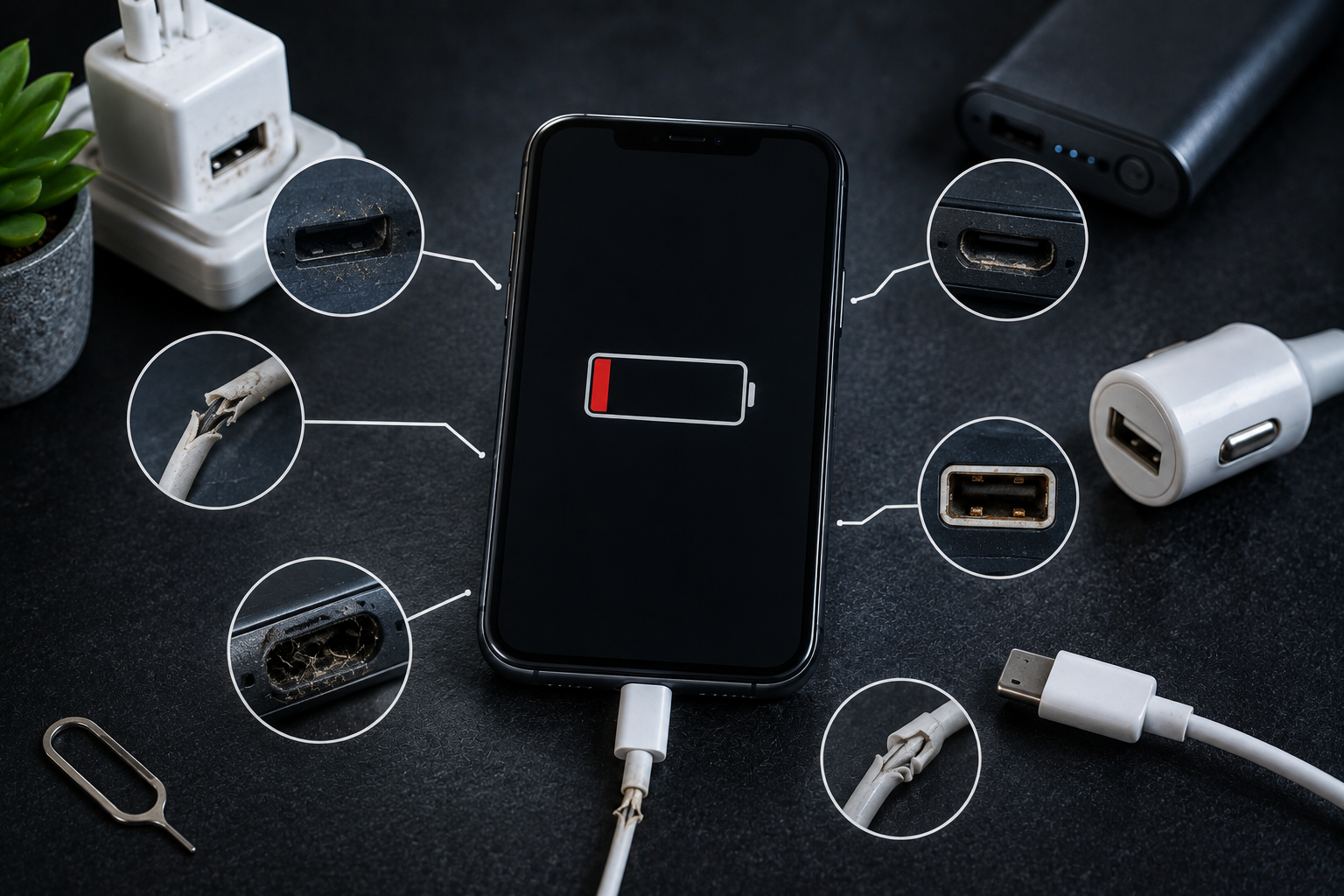
Smartphones have become an essential part of everyday life, and reliable charging is necessary to keep them running. When a phone charges slowly, stops charging, connects and disconnects repeatedly, or refuses to charge at all, it can quickly become frustrating. Charging problems are common, but they do not always mean that the battery needs to be replaced.
Several different components work together to charge a smartphone. The charging cable, adapter, charging port, battery, software, and internal charging circuitry can all affect charging performance. Identifying the actual cause is important because replacing the wrong component may not solve the problem.
If your smartphone is experiencing persistent charging issues, professional cell phone repair El Paso services can inspect the device and determine what is causing the problem. Whether you use an iPhone or Samsung Galaxy, early diagnosis can help prevent a small charging issue from becoming a more expensive repair.
What Causes Smartphone Charging Problems?
Smartphone charging problems can develop for many reasons. Some are simple and easy to fix, while others require professional attention.
Common causes include:
- Damaged charging cables
- Faulty charging adapters
- Dirty charging ports
- Loose charging connections
- Aging batteries
- Software problems
- Liquid exposure
- Physical damage
- Overheating
- Faulty charging circuits
- Incompatible accessories
- Wireless charging problems
The first step is determining exactly how your phone is behaving when you connect it to a charger.
1. Damaged Charging Cable
A damaged charging cable is one of the most common causes of charging problems.
Charging cables are frequently bent, twisted, pulled, and stored in bags or pockets. Over time, the internal wires can become damaged even when the outside of the cable looks normal.
A faulty cable may cause:
- Slow charging
- Intermittent charging
- Charging that stops unexpectedly
- No charging
- Charging only when the cable is positioned a certain way
Try using another compatible, high-quality cable to determine whether the cable is responsible.
If the phone charges normally with another cable, replacing the damaged cable may solve the problem.
2. Faulty Charging Adapter
The wall adapter also plays an important role in charging.
An adapter that is damaged, incompatible, or no longer functioning properly may provide insufficient power.
You may notice that your phone:
- Charges unusually slowly
- Does not recognize the charger
- Starts and stops charging
- Takes much longer to reach full charge
Testing the phone with a compatible adapter can help identify whether the charger is responsible.
Avoid using low-quality or questionable charging accessories that may not meet the requirements of your device.
3. Dust and Debris in the Charging Port
The charging port is exposed to the environment every day.
Dust, lint, and debris can accumulate inside the port, preventing the charging cable from making proper contact.
A dirty charging port may cause:
- Loose cable connection
- Slow charging
- Intermittent charging
- Charging that stops when the phone moves
- Cable not inserting completely
Do not use needles, pins, or other sharp metal objects to clean the port. These can damage delicate contacts inside the connector.
If the port is heavily blocked, professional cleaning is safer.
4. Loose Charging Port
Over time, repeated plugging and unplugging can affect the charging port.
If the cable feels unusually loose or moves excessively inside the port, the connector may be damaged or worn.
You may notice that charging works only when the cable is held at a particular angle.
This is an important warning sign because repeatedly moving or forcing the cable can make the damage worse.
A professional technician can inspect the charging port and determine whether cleaning, repair, or replacement is necessary.
5. Aging Smartphone Battery
Smartphone batteries naturally lose capacity as they age.
An older battery may not perform as reliably as a newer one. You may notice:
- Faster battery drain
- Longer charging times
- Unexpected shutdowns
- Excessive heat
- Battery percentage changing unusually
Battery aging does not always mean that the phone will stop charging, but it can contribute to charging and power-related problems.
If your phone is several years old and has multiple battery symptoms, professional battery testing may be useful.
6. Software Problems
Charging issues can sometimes be caused by software rather than hardware.
A temporary operating system glitch may prevent the phone from correctly recognizing the charger.
Before assuming there is a hardware problem, try restarting the phone.
Also check whether your device has available software updates.
If the charging problem started after an application installation or system update, software may be contributing to the issue.
7. Overheating During Charging
Smartphones naturally produce some heat while charging, but excessive heat can cause charging to slow down or stop temporarily.
Modern phones may reduce charging speed when temperatures become too high to protect the battery and internal components.
Overheating may happen when:
- Charging in direct sunlight
- Using the phone heavily while charging
- Playing demanding games while connected
- Using an incompatible charger
- Charging in a very hot environment
If your phone becomes unusually hot during charging, stop demanding activities and allow it to cool naturally.
8. Liquid Exposure
Water and other liquids can cause serious charging problems.
The charging port provides a direct opening into the phone, which means moisture can potentially reach internal components.
If moisture is detected, some smartphones may temporarily disable charging to reduce the risk of electrical damage.
After liquid exposure, you may experience:
- Charging failure
- Charging warnings
- Intermittent charging
- Corrosion
- Battery problems
Do not force a charging cable into a wet port.
If charging problems continue after liquid exposure, professional inspection is recommended.
9. Physical Damage From Drops
A smartphone does not need to have a cracked screen to suffer internal damage.
A drop can damage:
- Charging port
- Internal connectors
- Charging circuitry
- Battery
- Mainboard components
If your phone stopped charging immediately after an impact, physical damage should be considered.
Professional cell phone repair El Paso services can inspect the device to determine which component has been affected.
10. Incompatible or Low-Quality Accessories
Not all charging accessories provide the same performance.
Low-quality cables and adapters may not deliver the power required by your smartphone.
They may also cause:
- Slow charging
- Unstable charging
- Excessive heat
- Connection problems
Using compatible, reputable charging accessories is generally the safer choice.
11. Charging Port Corrosion
Liquid exposure can cause corrosion inside the charging port.
Corrosion may not always be visible from the outside, but it can interfere with electrical contact.
Possible symptoms include:
- Charging only occasionally
- Cable connection problems
- Slow charging
- Charging stopping unexpectedly
If corrosion is suspected, professional inspection is recommended.
12. Faulty Charging Circuit
The charging port and battery are not the only components involved in charging.
Smartphones contain internal charging circuits that regulate how power reaches the battery.
If the charging circuit becomes damaged, the phone may stop charging even when the cable, adapter, and port appear normal.
Charging circuit damage can occur because of:
- Electrical faults
- Poor-quality accessories
- Liquid exposure
- Physical impact
- Component failure
This type of problem generally requires professional diagnosis and repair.
13. Wireless Charging Problems
Wireless charging eliminates the need for a physical charging port, but it can still experience problems.
Wireless charging may be affected by:
- Misalignment
- Thick phone cases
- Incompatible charging pads
- Debris
- Excessive heat
- Damaged wireless charging components
Make sure the phone is correctly positioned on the charging pad.
If wireless charging works only occasionally, try removing the case and testing another compatible charging pad.
14. Phone Case Interference
Some thick cases can interfere with wireless charging or prevent a cable from being fully inserted.
If charging problems started after changing your phone case, remove it and test the device again.
For wired charging, make sure the case opening does not interfere with the connector.
For wireless charging, make sure the case is compatible with your charging system.
15. Background Apps and Heavy Usage
Using your smartphone heavily while charging can make it appear as though the phone is charging slowly.
For example, gaming, navigation, streaming, and video calls consume significant amounts of energy.
If the phone is using power almost as quickly as it receives it, the battery percentage may increase very slowly.
Try charging the phone while it is not being used heavily.
If charging becomes normal, the problem may have been excessive power consumption rather than a faulty charging system.
How to Troubleshoot a Smartphone That Is Not Charging
Before seeking professional repair, try these basic steps.
Try Another Cable
Use a compatible cable that you know works properly.
Try Another Adapter
Test a different compatible charging adapter.
Restart the Phone
A restart can resolve temporary software problems.
Remove the Case
Make sure the case is not interfering with the charging connection.
Check the Charging Port
Look for visible dust or debris, but avoid inserting sharp objects.
Let the Phone Cool
If the device is hot, allow it to cool before charging again.
Test Another Power Source
Try a different wall outlet or appropriate power source.
If none of these steps solve the problem, professional diagnosis may be necessary.
iPhone Charging Problems
iPhones can experience charging problems caused by damaged cables, blocked charging ports, battery aging, liquid exposure, software problems, physical damage, or internal charging components.
If your iPhone is not charging correctly, professional iphone repair El Paso can help determine the cause.
If the phone also has a damaged display, professional iphone screen repair El Paso can address screen-related damage while the charging issue is diagnosed.
Samsung Charging Problems
Samsung Galaxy phones can experience similar charging issues, including slow charging, intermittent connections, damaged ports, battery problems, and software-related issues.
If your Samsung phone will not charge properly, professional samsung phone repair El Paso can help identify whether the problem involves the charging port, battery, charging circuitry, or another component.
How to Prevent Charging Problems
Proper care can reduce the likelihood of charging issues.
Handle Charging Cables Carefully
Avoid sharply bending or pulling the cable.
Keep the Charging Port Clean
Prevent dust and lint from accumulating around the port.
Keep Your Phone Away From Liquids
Moisture can damage both the charging port and internal circuitry.
Use Compatible Accessories
Choose charging cables and adapters designed for your device.
Avoid Excessive Heat
Do not leave your phone charging in direct sunlight or extremely hot environments.
Avoid Heavy Use While Charging
Give your phone a break during charging whenever possible.
Do Not Force the Connector
If a cable does not fit properly, inspect the port and connector rather than forcing it.
When Should You Seek Professional Repair?
Professional repair may be necessary if:
- Your phone does not charge with multiple compatible chargers
- The charging cable feels loose
- Charging works only at a specific angle
- The port appears damaged
- The phone was exposed to liquid
- Charging problems started after a drop
- The phone becomes unusually hot while charging
- The battery drains rapidly
- Wireless and wired charging both fail
- The problem continues after basic troubleshooting
A professional technician can test the charging system and identify the actual cause.
Conclusion
Smartphone charging problems can result from simple issues such as damaged cables, faulty adapters, dirty charging ports, incompatible accessories, or software glitches. More serious problems may involve an aging battery, liquid damage, physical impact, charging circuitry, or internal connectors.
Before scheduling a repair, try another compatible cable and adapter, restart your phone, remove the case, check for visible debris, and allow an overheated device to cool. Never force a charging cable into the port or use sharp tools to clean inside it.
If the problem continues, professional cell phone repair El Paso services can inspect your smartphone and determine the appropriate solution. Whether you need iphone repair El Paso, iphone screen repair El Paso, or samsung phone repair El Paso, Your SmartPhone Solutions can help diagnose charging and other smartphone problems. Addressing charging issues early can prevent additional damage, improve reliability, and help extend the useful life of your device.
- Goth Lifestyle
- Fashion & Style
- Music & Bands
- Art & Photography
- Creative Writing & Poetry
- Events & Scene
- Occult & Spirituality
- DIY & Tutorials
- Beauty & Self-Care
- Relationships & Dating
- Gaming & Media
- Tech & Gadgets
- Body Art & Piercings
- Underground Culture
- Spotlights & Interviews
- Travel & Places
- Lifestyle & Daily Life
- Fitness & Health
- Travel & Adventure
- Books & Literature
- Tech & Gaming
- Movies & TV
- Food & Drinks
- Humor & Memes
- Pets & Animals
- General Arts & Crafts

 English
 Arabic
 French
 Spanish
 Portuguese
 Deutsch
 Turkish
 Dutch
Dutch
 Italiano
 Romaian
 Portuguese (Brazil)
 Greek
Greek
